 Back to Blog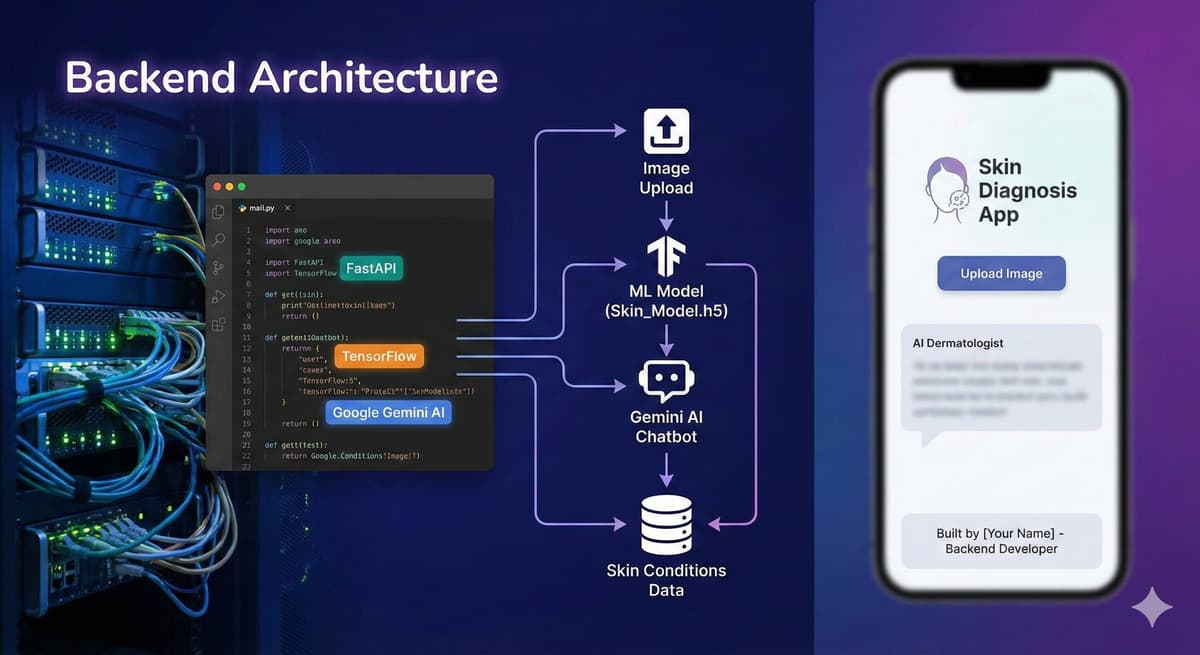
One of my most challenging and rewarding projects has been building a skin diagnosis application that leverages machine learning to help users identify common skin conditions. In this post, I'll walk you through the architecture, challenges, and lessons learned.
The Problem
Access to dermatologists is limited in many parts of Kenya and across Africa. Many skin conditions, if caught early, can be treated effectively with basic medication. I wanted to build a tool that could serve as a first-pass screening tool — not a replacement for doctors, but a way to help people understand when they should seek professional care.
Architecture & Tech Stack
The app uses a three-tier architecture: a Flutter mobile frontend for cross-platform support, a FastAPI backend for handling image processing and API requests, and a TensorFlow model trained on dermatological image datasets. Google Gemini AI provides an additional layer of analysis with natural language explanations of the diagnosis.
- Frontend: Flutter for cross-platform mobile development
- Backend: FastAPI for high-performance async Python APIs
- ML Model: TensorFlow with transfer learning on skin condition datasets
- AI Assistant: Google Gemini AI for natural language diagnosis explanations
Key Challenges
The biggest challenge was model accuracy across different skin tones. Most publicly available dermatological datasets are heavily biased toward lighter skin tones, which meant I had to carefully curate and augment the training data to ensure the model worked well for African skin tones. Data augmentation techniques like color jittering, rotation, and brightness adjustment helped improve generalization.
Lessons Learned
Building for resource-constrained environments means every optimization matters. I learned to compress models for mobile deployment, implement offline caching for areas with poor connectivity, and design UIs that work well on older devices with smaller screens. The most important lesson? Always build with your users in mind, not just the technology.